

 All of my writing is licensed under a
 Automatic SVN Revision Numbering in ASP.Net MVC
Update: I've written an open source .Net build tool that can also put the highest SVN revision into a file automatically on build - check it out!
While working on an internal ASP.Net MVC project at work, I wondered if it was possible to get the SubVersion (SVN) repository number to be automatically updated on the webpages I was creating every time I did a build or check-in.
The footer at the bottom of the StackOverflow.com site is what we’re trying to do here (though I suspect after listening to their podcasts that they’ve got theirs updated using custom build tasks in Cruise Control.Net..
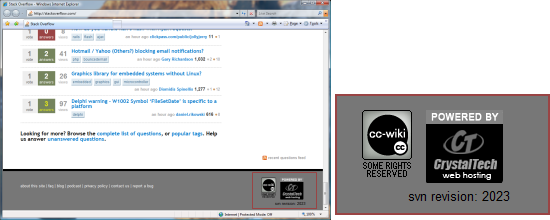
After a couple of hours of investigation, trial and error, here’s one way to do it.
Before we begin, we’ll need TortoiseSVN installed, and a local working copy of your ASP.Net MVC project checked out.
There are essentially 3 steps..
1. Create a Html Helper
This greatly simplifies the return of the SVN number as a string which is then trivial to place in our View Page or footer.
' HtmlHelpers.vb
Imports System.Runtime.CompilerServices

Public Module HtmlHelpers

  <extension()> _
  Public Function SVNRevision(ByVal helper As HtmlHelper) As String
    Dim svnFile As IO.StreamReader
    Dim svnRev As String = String.Empty
    Try
      svnFile = New IO.StreamReader("svn_rev.txt")
      svnRev = svnFile.ReadLine()
      svnRev = svnRev.Replace("""", "")
      svnFile.Close()
    Catch FnFex As IO.FileNotFoundException
      ' swallow, but write out the file and location we tried to read..
      Trace.WriteLine("HtmlHelper.SVNRevision: Ex: [" & FnFex.Message & "]")
    Finally
      If svnRev.Length = 0 Then svnRev = "-"
    End Try

    Return svnRev
  End Function

End Module
2. Create a Batch File and add it as a custom build task to the project
Next we create a Batch File (.bat) in the root of our project, which will call the TortoiseSVN command to retrieve the SVN revision number from our working copy.
We’ll call it CreateSvnRevFile.bat. Here’s the contents:
@echo off
rem # CreateSvnRevFile.bat
rem # Check the Working Copy folder is passed in..
if /I [%1%]==[] goto usage else goto start
:start
rem # (Re)Create the base file so SubWCRev has something to replace
echo "$WCREV$" > svn_rev.txt
rem # Ask SubWCRev to replace with the latest revision
rem # from the current (working copy) directory
C:\Progra~1\TortoiseSVN\bin\SubWCRev.exe %1 svn\_rev.txt svn\_rev.txt
rem # Copy the file for local hosting and testing purposes..
copy svn_rev.txt "C:\Program Files\Microsoft Visual Studio 9.0\Common7\IDE" /Y
del svn_rev.txt /Q
goto end

:usage
echo Usage: %0 SvnWorkingCopyDir

:end
rem exit 0
Then we need to add a custom Build Event action to call the Batch File. (The Build Events dialog is in “My Project > Compile > Build Events”)
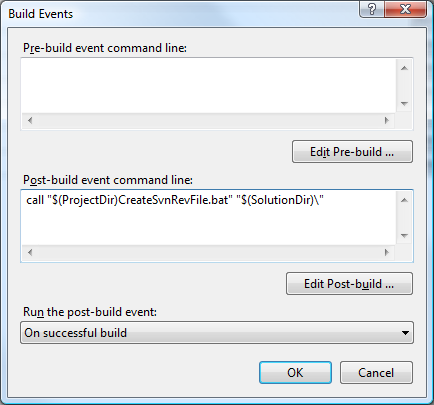
As shown above, we need to add the following line to the “Post-build event command line:” box..
call "$(ProjectDir)CreateSvnRevFile.bat" "$(SolutionDir)\"
3. Add the SVN revision number to our Page
With all of that background plumbing in place, all we need to do now is add a couple of lines of code in the appropriate .aspx file wherever we want our SVN revision number to appear:
...
<%@ import Namespace="MyMvcProject" %>
...
<%= Html.SVNRevision() %>
...
The first line imports our Project Namespace (which will obviously depend on your project - you may need to rebuild at this point before the <%= Html. autocomplete picks up the .SVNRevision() HtmlHelper).
And we’re done:
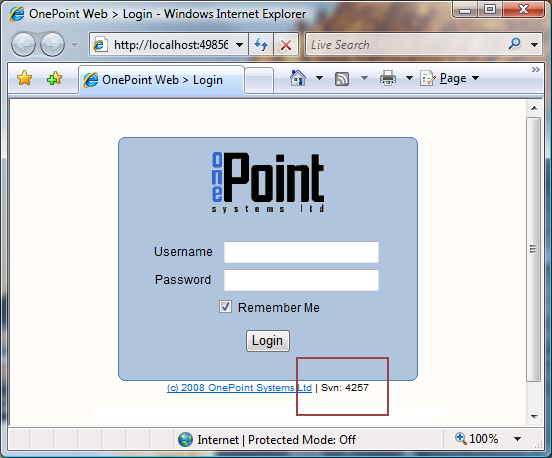
So, how does it work?
The Post-build task CreateSvnRevFile.bat does most of the work by creating a temporary text file called svn_rev.txt containing the string "$WCREV$", and then calls the TortoiseSVN command SubWCRev.exe on the text file to replace the string with the working copy revision number. It’s worth noting that the revision number is held in the working copy .svn folder so this method doesn’t require a call to your SVN server to work.
The HtmlHelper code then simply tries to read the updated text file and returns the contents as a string, or it returns a dash (“-“) if there was a problem.
Obviously, if we’re using this on a high-traffic website or frequently referenced page then we’d want to cache the string rather than reading it from the file every time. We could do this by modifying the HtmlHelper to read the file once into a variable, which we could do by wrapping the actual file reading up in a singleton object, for example.
I hope you find it useful 🙂